
Professional CAD software has always demanded a trade-off.
You could choose a powerful engineering platform with deep features, dense menus, and a serious learning curve. Or you could choose a simpler modeling tool that felt more creative but lacked the precision required for manufacturing.
Shapr3D is built around the idea that designers should not have to make that choice.
It combines a modern, touch-friendly interface with precision solid modeling, parametric design history, technical drawings, visualization, augmented reality, manufacturing exports, and cross-device access.
You can begin shaping an idea with an Apple Pencil, continue refining it on a Mac or Windows workstation, generate technical drawings, share the model through a browser, and review it at full scale in augmented reality.
That sounds almost too smooth for professional CAD, doesn’t it?
The important question is whether Shapr3D is merely easier to use—or whether it is strong enough to become part of a serious product-design and manufacturing workflow.
This Shapr3D review examines the platform’s major features, AI tools, professional applications, pricing, strengths, limitations, and the type of designer who will benefit from it most.
Editorial note: This review is based on Shapr3D’s official website, product documentation, feature pages, pricing information, and published requirements available in September 2026. Features and prices can change. Verify current details before purchasing or changing a production workflow.
What Is Shapr3D?
Shapr3D is a three-dimensional computer-aided design application for product development, industrial design, engineering, woodworking, architecture, manufacturing, and 3D printing.
It runs natively on:
- iPadOS
- macOS
- Windows
- visionOS
The platform is built on Siemens Parasolid, a geometric modeling kernel used within established professional CAD systems. This is a meaningful technical foundation because it allows Shapr3D to work with precise solid geometry instead of functioning only as a visual mesh modeler.
According to the official Shapr3D overview, the software supports both direct modeling and history-based parametric workflows. It also supports input devices such as Apple Pencil, Wacom tablets, SpaceMouse, mouse and keyboard, and custom keyboard shortcuts.
Shapr3D is therefore not simply an iPad sketching application.
It is a precision CAD environment with a mobile-first philosophy.
Why Shapr3D Feels Different From Traditional CAD
Traditional CAD applications are often organized around toolbars, property panels, feature trees, nested dialogs, and large collections of engineering commands.
That power is valuable, but it can interrupt creative flow. New users spend considerable time learning where tools are located before they can concentrate on what they are designing.
Shapr3D approaches the interaction differently.
Its interface responds to the geometry you select. When you choose a profile, the application can present relevant modeling operations. When you select an edge, tools such as Fillet or Chamfer become available. When you select a face, the software offers operations appropriate to that face.
This adaptive approach reduces visual clutter.
The result is a tool that feels more like direct manipulation than conventional command-based CAD. You push, pull, rotate, sketch, offset, cut, and combine geometry while receiving immediate visual feedback.
But simplicity does not mean removing all structure. Shapr3D has added history-based parametric modeling so important design relationships and previous operations can remain editable.
That combination—direct interaction plus parametric control—is the heart of the product.
Direct Modeling Meets Parametric History
Direct modeling is excellent for speed.
A designer can select a face and move it, modify a profile, pull geometry into a solid, or adjust a curve without planning a complete feature structure first. This is ideal during early concept development because ideas rarely arrive in a perfect sequence.
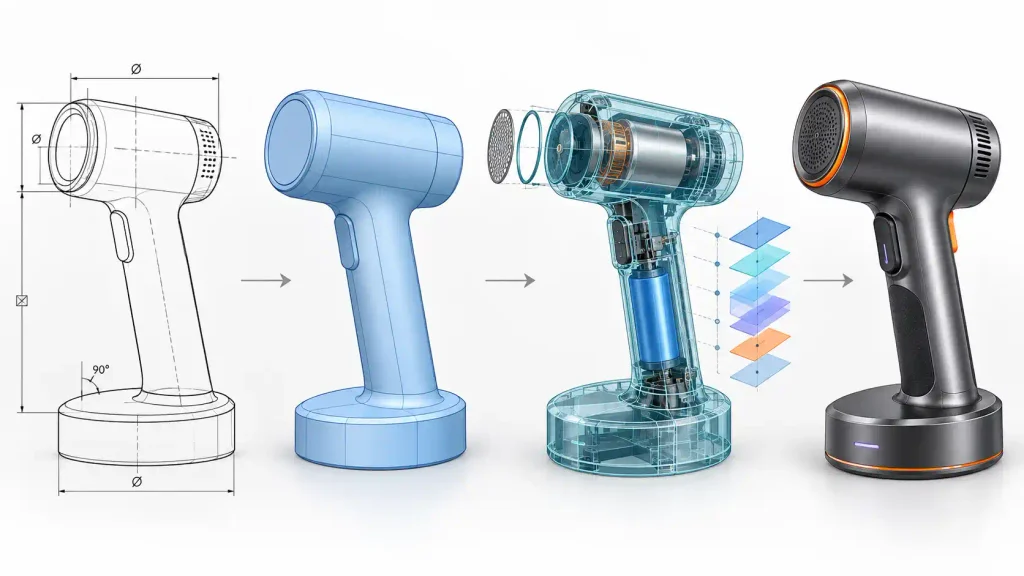
You explore. You change your mind. You discover better proportions. You move quickly.
Parametric modeling offers a different advantage. It records operations and preserves relationships so earlier decisions can be changed without manually rebuilding everything that followed.
Shapr3D supports both approaches.
You can quickly shape a concept through direct manipulation and still maintain a design history for controlled changes. This makes the software useful for the stage between a rough sketch and a fully engineered product.
Imagine you are designing a portable speaker.
You might:
- Sketch its main profile.
- Extrude the body.
- Round the outer edges.
- Shell the enclosure.
- Add a speaker opening.
- Create control-button cutouts.
- Pattern ventilation holes.
- Apply an embossed brand mark.
- Adjust the original dimensions after reviewing the result.
With history-based modeling, changing the body width or wall thickness can update later operations while protecting the original design intent.
That makes revisions much less destructive.
Sketching and Constraints
Most accurate solid models begin with a controlled two-dimensional sketch.
Shapr3D includes tools for lines, circles, arcs, rectangles, ellipses, polygons, splines, patterns, and mirrored geometry. Designers can enter exact measurements or sketch freely and refine the dimensions afterward.
The software also supports geometric and dimensional constraints.
These include:
- Horizontal and vertical
- Parallel
- Perpendicular
- Tangent
- Coincident
- Concentric
- Midpoint
- Equal
- Symmetry
Constraints define how sketch elements relate to one another. A tangent line remains tangent. Two equal circles remain the same size. A symmetrical profile continues to behave symmetrically when its dimensions change.
Shapr3D identifies fully defined sketch geometry in green and under-defined elements in blue. A fully defined sketch has enough dimensions and relationships to prevent accidental movement.
The Shapr3D constraints overview explains that its constraint system uses Siemens D-Cubed 2D DCM. It also supports automatic constraints for common relationships.
Auto-constraining is useful during fast exploration, but professional users should still inspect the final sketch. Automatically detected relationships may not always match the designer’s long-term intention.
A sketch can be numerically correct today and still behave badly during tomorrow’s revision if its constraints are poorly planned.
Core 3D Modeling Tools
Shapr3D provides the main tools required for solid modeling and product concept development.
Its toolset includes:
- Extrude
- Revolve
- Loft
- Sweep
- Shell
- Fillet
- Chamfer
- Union
- Subtract
- Intersect
- Split Body
- Project
- Replace Face
- Linear patterns
- Circular patterns
- Mirror
- Wrap
- Emboss
These tools cover a wide range of common design tasks.
Loft can build a form between multiple cross-sections. Sweep can extend a profile along a path to create pipes, handles, seals, cables, or structural members. Shell can turn a solid into a hollow component with controlled wall thickness.
Boolean tools combine or subtract bodies, while patterns repeat features predictably.
Wrap and Emboss are especially useful for placing text, logos, tread patterns, grip details, or decorative elements onto cylindrical and conical surfaces.
The official 3D modeling page explains that the software is designed for both push-pull modeling and parametric design history. This balance makes Shapr3D particularly strong for concept-to-detail workflows.
It is fast enough for creative exploration but structured enough to produce useful engineering geometry.
Apple Pencil and Touch-Based CAD
Shapr3D originally became known for bringing serious CAD interaction to the iPad.
The Apple Pencil changes the physical feeling of modeling. Instead of operating through only a mouse and keyboard, designers can select, sketch, drag, and manipulate geometry with a pen.
This is especially valuable during:
- Client workshops
- Factory-floor discussions
- Design reviews
- Site visits
- Travel
- Early ideation
- Furniture planning
- Product-development meetings
A designer can sit beside a client, sketch a change, turn it into geometry, and review the revised form without returning to a separate workstation.
That immediacy improves communication.
Still, touch input does not make every operation faster. Complex assemblies, detailed drawing annotation, extensive file organization, and long production sessions may remain more comfortable with a large monitor, keyboard, and precise pointing device.
The advantage is choice.
Shapr3D maintains a consistent workflow across iPad, Mac, and Windows, allowing the user to select the most suitable device for each stage.
Cross-Device and Offline Workflow
Shapr3D is installed locally rather than operating only through a browser.
Projects can be stored on the device and synchronized through Shapr3D Cloud when an internet connection becomes available. The company states that designers can continue working offline and synchronize later.
This is valuable for workshops, manufacturing floors, construction sites, flights, and locations with unreliable internet access.
A realistic cross-device workflow might look like this:
- Sketch the idea on an iPad during a client meeting.
- Refine dimensions on a Windows workstation.
- Review materials on a Mac.
- Open the latest model on the factory floor.
- Share a browser-based review link with the client.
- Present the object at full scale through AR.
The value is not simply “CAD on several devices.” The real value is continuity.
Your model remains the center of the workflow rather than being replaced by screenshots, exported PDFs, or disconnected presentation files at every stage.
2D Drawings and Manufacturing Documentation
A good 3D model is not always enough for manufacturing.
Suppliers and fabricators may require dimensions, tolerances, projections, notes, scales, title blocks, hidden lines, and standard drawing layouts.
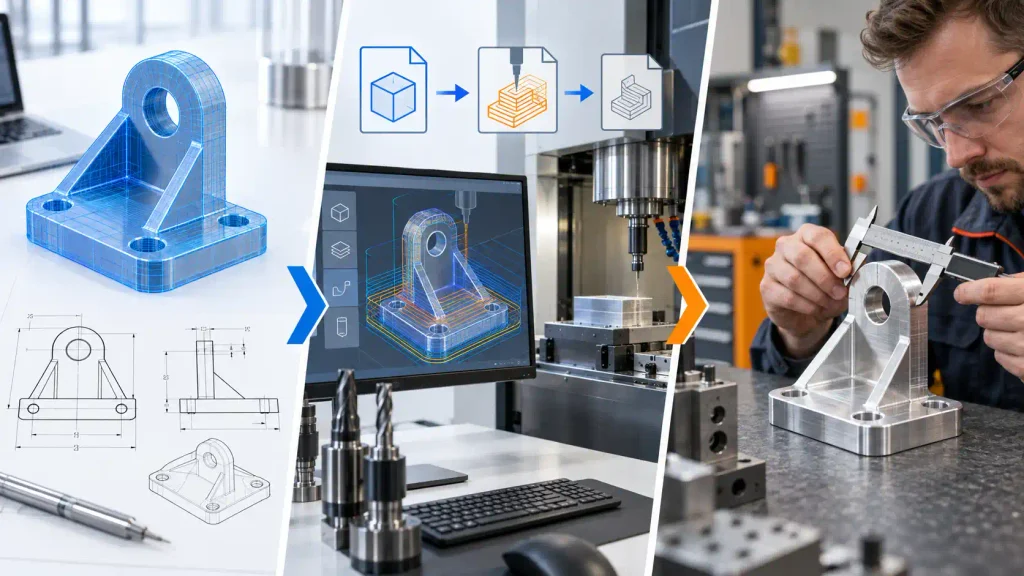
Shapr3D can create 2D drawings directly from three-dimensional bodies. Users can select a model, establish the drawing scale and orientation, add projected views, annotate dimensions, and organize multiple drawings within the same project.
The software supports ISO- and ANSI-oriented settings, custom title blocks, hidden-line options, notes, tolerances, and several dimension types.
According to Shapr3D’s 2D drawing feature page, drawings can be updated after the related 3D model changes.
That connection reduces the chance of delivering documentation that no longer matches the latest design.
However, manufacturing responsibility still rests with the designer or engineer.
The software can generate a drawing, but it cannot automatically determine whether every tolerance is appropriate, whether a material will behave correctly, or whether a supplier can achieve the specified finish.
Documentation tools communicate decisions. They do not replace engineering judgment.
Visualization and AI-Generated Environments
Shapr3D includes a real-time visualization mode for applying materials, adjusting lighting, and presenting CAD models with a more realistic appearance.
The official visualization page currently lists more than 100 materials, multiple environment options, real-time PBR visualization, and support for custom materials through GLB files.
This allows designers to test questions such as:
- Should this enclosure use matte or glossy plastic?
- Does the product look too heavy in dark metal?
- Which wood finish best communicates the intended price level?
- Are the material separations visually balanced?
- Will a transparent component reveal unwanted internal geometry?
- Does the design still look coherent under different lighting?
Shapr3D also provides Generative Render.
Users can describe an environment in natural language and generate a context-rich image around the model. A chair might be placed in a minimalist apartment. A power tool might appear inside a professional workshop. A consumer product might be presented within a studio advertising scene.
This is useful for concept presentation, stakeholder communication, and visual direction.
But generated context is not the same as a physically verified render.
AI can introduce incorrect shadows, alter small design details, invent surroundings, or create visual relationships that do not match the real model. Therefore, Generative Render should be treated as a presentation and ideation tool—not as engineering evidence.
When design accuracy matters, compare every generated image with the source CAD model.
Shapr3D’s Approach to AI
Shapr3D’s AI strategy is more controlled than the “type one sentence and receive a perfect product” message used by many generative-design platforms.
The company says it combines third-party language and generative models with internally trained, design-specific models. Its AI approach statement also says customer inputs are encrypted in transit and at rest and that third-party AI providers are not permitted to use, retain, or train their models with Shapr3D customer data.
Shapr3D may use internal, de-identified, or aggregated information to improve its own systems.
For businesses handling unreleased products, patents, automotive components, medical equipment, or confidential manufacturing data, these details deserve proper review.
Do not rely only on a marketing summary. Enterprise buyers should examine:
- Data-processing terms
- Storage location
- Retention rules
- Administrator controls
- AI feature permissions
- Private-cloud options
- On-premises options
- Cloud-off workflows
- Supplier access
- Incident-response commitments
Shapr3D lists private cloud, on-premises, and cloud-off storage options under Enterprise plans. Suitability still depends on each organization’s legal, security, and compliance requirements.
Integrated Augmented Reality
Augmented reality is one of Shapr3D’s most practical presentation features.
On a supported iPad, the designer can place a model into a real environment at full scale without first exporting it into a separate AR workflow.
A furniture designer can check whether a table feels too large for a room. A factory team can preview a fixture beside an assembly line. An architect can study a spatial object on location. A product designer can compare several form concepts on a real desk.

Shapr3D’s AR feature page states that shared designs can also be reviewed in AR through its web application.
AR does not prove that a component will fit with manufacturing-level accuracy. Device tracking, room scanning, surface detection, and visual scale can introduce small errors.
Use AR for contextual validation and communication. Use verified measurements for fabrication and installation.
Apple Vision Pro and Immersive Review
Shapr3D extends its spatial workflow to Apple Vision Pro.
The platform positions this as more than a passive model viewer. Teams can review and edit CAD models in an immersive environment, making it possible to evaluate objects at a more natural spatial scale.
This has potential for:
- Vehicle components
- Industrial machinery
- Retail fixtures
- Furniture
- Exhibition structures
- Medical products
- Architectural elements
- Large equipment
Immersive review can reveal proportion and access problems that are difficult to understand on a flat display.
But XR should be considered an additional review layer, not a substitute for physical prototyping, tolerance studies, ergonomic testing, or engineering validation.
Sharing, Review Links, and Collaboration
CAD collaboration often breaks down when reviewers do not own the same software.
Designers send screenshots. Clients annotate PDFs. Engineers exchange exported files. Feedback becomes separated from the model it refers to.
Shapr3D’s browser-based review links are designed to reduce this friction.
A designer can publish a model and send a secure link. Reviewers can open it in a modern browser, rotate and zoom the model, inspect drawings and visualizations, view it through AR, and add comments without installing Shapr3D.
The online CAD viewer page describes access controls for public-link viewers, account members, and specifically invited email recipients.
Team spaces provide shared project storage, role-based access, model versions, and cloud synchronization. Shapr3D lists viewer, commenter, and editor roles for controlling participation.
This is valuable because it keeps feedback closer to the actual design.
Still, teams need a clear approval system. A comment is not automatically an engineering change request, and a shared model is not automatically approved for production.
Define who can review, who can modify, and who has authority to release manufacturing files.
CAD File Compatibility
A CAD tool becomes far more valuable when it can communicate with the rest of the production pipeline.
Shapr3D supports several native, neutral, mesh, drawing, and visualization formats. Availability varies by subscription plan.
Prominent formats include:
- X_T and X_B
- STEP
- IGES
- JT
- SLDPRT
- SLDASM
- CATPART
- PRT
- STL
- 3MF
- OBJ
- FBX
- GLB
- DWG
- DXF
The Shapr3D file-format page states that imported geometry can be simplified, healed, or otherwise adjusted through advanced import settings. Parasolid formats are particularly important because Shapr3D uses the same geometric kernel.
Professional users should test real project files before adoption.
A format appearing on a compatibility list does not guarantee that every feature, material, assembly relationship, metadata field, construction history, or drawing standard will transfer perfectly.
Always test:
- Large files
- Complex surfaces
- Assemblies
- Layer structures
- Units
- Part names
- Colors
- Materials
- Hidden bodies
- Drawing sheets
- Exported tolerances
- Round-trip geometry
The safest evaluation uses your own files, not a simple demonstration model.
Where Shapr3D Fits Best
Shapr3D is particularly strong for product and industrial designers who need to move from idea to precise geometry quickly.
Product and Industrial Design
Designers can explore form, adjust proportions, create manufacturable solids, test materials, and communicate ideas without building a heavy traditional CAD workflow at the concept stage.
3D Printing
The platform supports STL and 3MF output for prototyping and printed parts. Parametric history makes it easier to adjust clearances, thicknesses, hole sizes, or overall dimensions after testing a print.
Woodworking and Furniture
Furniture makers can model cabinets, shelves, joints, frames, fixtures, and custom pieces while working close to the physical workshop.
Technical drawings and AR can help communicate dimensions and preview scale.
Manufacturing Teams
A mobile CAD tool is useful when the design discussion happens beside a machine rather than inside a design office.
Jigs, fixtures, guards, brackets, replacement parts, and process improvements can be modeled close to the real problem.
Architectural Concepts
Shapr3D can support spatial studies, furniture layouts, facade elements, exhibition structures, and architectural concept models.
However, it is not presented as a complete BIM authoring platform. Large documentation sets, building data, schedules, multidisciplinary coordination, and construction management may require specialist architectural software.
Shapr3D Pricing
Shapr3D currently offers Basic, Pro, Enterprise, and education-related access.
The free Basic plan allows users to explore the modeling workflow but limits them to two projects and basic-resolution 3MF and STL exports.
At the time of this review, the official pricing page lists Pro at $299 per editor seat when billed annually, excluding VAT. The page states that annual billing saves 34% compared with monthly billing.
Pro expands the workflow with unlimited projects, higher-resolution exports, professional CAD formats, visualization, drawings, AR, review links, and a higher daily allowance for generative renders.
Enterprise pricing is provided through the sales team and includes additional compatibility, storage, access, security, and organizational controls.
Pricing should be evaluated against saved time, not just subscription cost.
If Shapr3D helps a professional complete one client revision faster, communicate a concept more clearly, or prevent one incorrect prototype, the subscription may pay for itself. A hobbyist who needs only occasional modeling may find the Basic plan sufficient until export restrictions become limiting.
Important Limitations
Shapr3D is powerful, but it should not be described as a universal replacement for every CAD platform.
The streamlined interface inevitably means some specialist workflows may need other tools.
Before adopting it as your primary system, verify your requirements if you depend on:
- Very large assemblies
- Advanced assembly relationships
- Motion studies
- Finite element analysis
- Computational fluid dynamics
- Dedicated CAM toolpaths
- Electrical design
- Sheet-metal-specific production workflows
- Complex configuration management
- Deep PLM integration
- Advanced surfacing
- Specialized industry plugins
- Full BIM documentation
- Film-quality rendering and animation
Shapr3D can exchange geometry with other platforms, so it may still serve as the fast concept and review layer within a broader toolchain.
Visualization is another area to understand correctly.
Its built-in PBR environment is excellent for evaluating materials and communicating a design quickly. It is not necessarily a replacement for a dedicated high-end renderer when you require cinematic lighting, complex animation, advanced particles, custom shaders, or advertising-level visual effects.
The same applies to AI rendering. A generated scene can sell the mood, but it may not preserve every engineering detail.
A Practical Shapr3D Workflow
A professional workflow could follow these stages:
1. Define the Product Requirements
Record dimensions, use conditions, materials, manufacturing method, load expectations, tolerances, and user needs.
2. Build a Fully Constrained Sketch
Create a stable geometric foundation. Use dimensions and constraints that express how the design should behave during revision.
3. Develop the Main Solid
Use Extrude, Revolve, Loft, Sweep, Shell, and Boolean operations to create the main structure.
4. Add Controlled Detail
Apply fillets, chamfers, patterns, openings, embossed features, and manufacturing details.
5. Review the Modeling History
Rename important steps where supported, check dependencies, and test whether major dimensions can change without breaking later operations.
6. Visualize Materials
Apply realistic materials and evaluate how color, reflectivity, texture, and finish affect the product.
7. Review in AR
Place the model into its intended environment and study its apparent size, accessibility, and relationship to nearby objects.
8. Collect Stakeholder Feedback
Publish a secure review link so clients, engineers, suppliers, or managers can inspect and comment on the same model.
9. Create Technical Drawings
Add dimensions, notes, tolerances, projections, scales, and title-block information required for manufacturing.
10. Export and Validate
Export the appropriate STEP, X_T, STL, 3MF, DWG, DXF, PDF, or other required format. Open the exported file in the receiving software and confirm geometry, units, naming, and scale.
Is Shapr3D Worth Learning?
Yes—especially for designers who value speed, mobility, and direct interaction but still need precise CAD geometry.
Its greatest achievement is making serious solid modeling feel more approachable without reducing the entire workflow to a basic mesh editor.
Shapr3D is a compelling choice for:
- Product designers
- Industrial designers
- 3D-printing professionals
- Furniture designers
- Woodworkers
- Manufacturing teams
- Freelancers
- Design students
- Engineers who need mobile concept tools
- Architects developing spatial concepts
It may be less suitable as the only application for teams requiring highly specialized simulation, CAM, assembly, BIM, or enterprise lifecycle functions.
The smartest approach is to test it with a real project.
Do not judge it by a five-minute cube demonstration. Import one of your existing models, create a new concept, revise important dimensions, generate a drawing, share a review link, export a manufacturing file, and verify the result in the next application.
That test will reveal whether Shapr3D genuinely removes friction from your workflow.
Final Verdict
Shapr3D represents a more human approach to professional CAD.
It recognizes that designers want to move quickly, touch their ideas, work away from a fixed workstation, and communicate in 3D without sacrificing accurate geometry.
Its combination of direct modeling, parametric history, Parasolid precision, technical drawings, visualization, AI-generated environments, AR, browser reviews, cloud synchronization, and manufacturing exports creates a remarkably complete concept-to-handoff workflow.
The platform’s real innovation is not simply CAD on an iPad.
It is continuity.
An idea can move from sketch to solid model, from model to visualization, from visualization to spatial review, and from approval to technical documentation without being repeatedly rebuilt.
Shapr3D will not replace every specialist engineering or visualization tool. It does not need to.
Its role is to make the most creative and collaborative parts of product development faster, clearer, and more accessible—while keeping the geometry precise enough to continue into serious production.
For modern 3D designers, that balance is difficult to ignore.
Frequently Asked Questions
Is Shapr3D free?
Shapr3D offers a free Basic plan with most core modeling functions, up to two projects, and basic-resolution STL and 3MF exports. Professional formats, unlimited projects, visualization, drawings, and advanced collaboration require a paid plan.
Is Shapr3D suitable for beginners?
Yes. Its adaptive interface, direct manipulation, built-in guidance, and touch controls make it easier to approach than many traditional CAD systems. Beginners still need to learn dimensions, constraints, manufacturing logic, and design intent.
Is Shapr3D professional CAD software?
Yes. It uses the Siemens Parasolid modeling kernel, supports history-based parametric modeling, produces technical drawings, and exports professional CAD and manufacturing formats.
Can Shapr3D replace SOLIDWORKS or Fusion?
It can replace parts of those workflows for many designers, particularly concept modeling, product design, prototyping, review, and manufacturing handoff. Workflows requiring specialist assemblies, simulation, CAM, or deeper lifecycle functions should be evaluated carefully.
Does Shapr3D work offline?
Yes. Shapr3D runs locally and allows offline modeling. Cloud-dependent collaboration, synchronization, sharing, and generative features require connectivity.
Can Shapr3D create realistic renders?
It provides real-time PBR visualization, more than 100 materials, custom GLB materials, lighting environments, and AI-generated contextual renders. Dedicated visualization software may still be preferable for cinematic animation or highly controlled advertising imagery.
Can Shapr3D be used for 3D printing?
Yes. It supports STL and 3MF exports. Export resolution varies by plan, and the final file should always be checked in slicing software before printing.
Does Shapr3D support augmented reality?
Yes. Its iPad application includes integrated AR, and shared models can be reviewed in AR through supported web experiences.
Which devices support Shapr3D?
Shapr3D runs on compatible iPads, Mac computers, Windows devices, and Apple Vision Pro. Current minimum operating-system requirements should be checked before installation.
Is Shapr3D an AI design generator?
Not primarily. It is a precision CAD application with selected AI-assisted features, particularly contextual visualization and generative rendering. Core geometry remains under the designer’s control.